Stellar Photo Recovery Software for Lost and Deleted Images
ClipsTrust understands the frustration of losing precious media files so according to their expert team they find some solutions. In the case of a system crash, unintentional deletion, or a corrupted SD card, the use of good photo recovery software is a must for everyone who needs to recover their photos securely.
Stellar Photo Recovery, a versatile Indian data recovery software, allows you to view and then retrieve your deleted images, videos, and sound files pretty much in a hassle-free process. This article will guide you through the different aspects of Stellar Photo Recovery software, including tips such as how to recover deleted photos from SD card and how to recover lost photos from a formatted drive.
What is Stellar Photo Recovery?
Stellar Photo Recovery is a dedicated and good photo recovery tool that scans your storage devices like hard drives, memory cards, USB drives, and brings back your missing and lost data.
It’s the best photo recovery software that supports a wide range of file formats and offers both quick and deep scan modes to ensure your lost media is restored safely and securely. Whether you use photo recovery for Windows or photo recovery for Mac, this software works efficiently on both.
If you're interested in expanding your backup solutions for PC, exploring the best backup software for Windows can complement your recovery efforts.
Reasons You Might Need Stellar Photo Recovery Tool
1. Accidental Deletion
Photos can sometimes be deleted by accident while one cleans up or organizes their files, or a memory card is incorrectly assumed to be empty and formatted. You can utilize the feature for recovery of deleted photos to retrieve them.
2. Storage Device Corruption
Memory cards, USBs, and hard drives can stop working properly due to power cuts, wrong removal, heat, or age, making photos seem lost. With SD card recovery and image recovery software, those memories can be retrieved.
3. File System Errors
System crashes, viruses, or software problems can stop your device from showing stored photos, even if they’re still there. That’s when you can recover photos after a system crash or accidental deletion.
To safeguard against future data loss caused by viruses, using reliable antivirus software like Avast is highly recommended.
4. Formatting Mistakes
Photos can be lost if a drive is wrongly formatted. Still, you can recover lost photos from formatted drives or even recover corrupted image files on Windows using this advanced software.
For comprehensive email and cloud backup solutions, which supplement file recovery tools, check out the best email backup tools and top cloud storage apps.
Stellar Photo Recovery: Pricing and Ratings Compared
Comparing pricing and ratings of stellar photo recovery with other photo recovery software are mentioned below:
Software | Pricing | Rating (out of 5) |
Stellar photo recovery | $49.99-$69.99/year | 4.6/5 |
Recuva | Free (Pro $24.95/year) | 3.75/5 |
Disk drill | $80/lifetime | 4.8/5 |
R-Studio | $80/one-time | 4.5/5 |
PhotoRec | Free | 4.5/5 |
If you are considering enterprise-level or regional specialist services, you may want to explore Stellar Data Recovery in Gurugram for local support and service options.
Key Features of Stellar Photo Recovery Software
Here are some crucial features of photo recovery software by Stellar:
Compatibility with 300+ file types, including JPEG, PNG, MP4, AVI, MP3, and WAV
Preview files prior to recovery to verify quality
Fast and deep scan options to recover deleted videos completely
Option to recover corrupted image files on Windows
Access and recover data from formatted, corrupted, or blocked drives
Repair broken or corrupted images and video files
The photo recovery tool for photographers and videographers provides professional-grade accuracy
For advanced software tools that can support broader data backup and conversion needs, including email and file formats, consider exploring solutions like Advik Software or BitRecover Software.
How to Download Stellar Photo Recovery Software?
Follow this step-by-step guide to using Stellar Photo Recovery:
Step 1: Install and setup
Visit the official Stellar website or search stellar photo recovery software free download to install. Save it on a separate drive from your lost photos to avoid overwriting data.
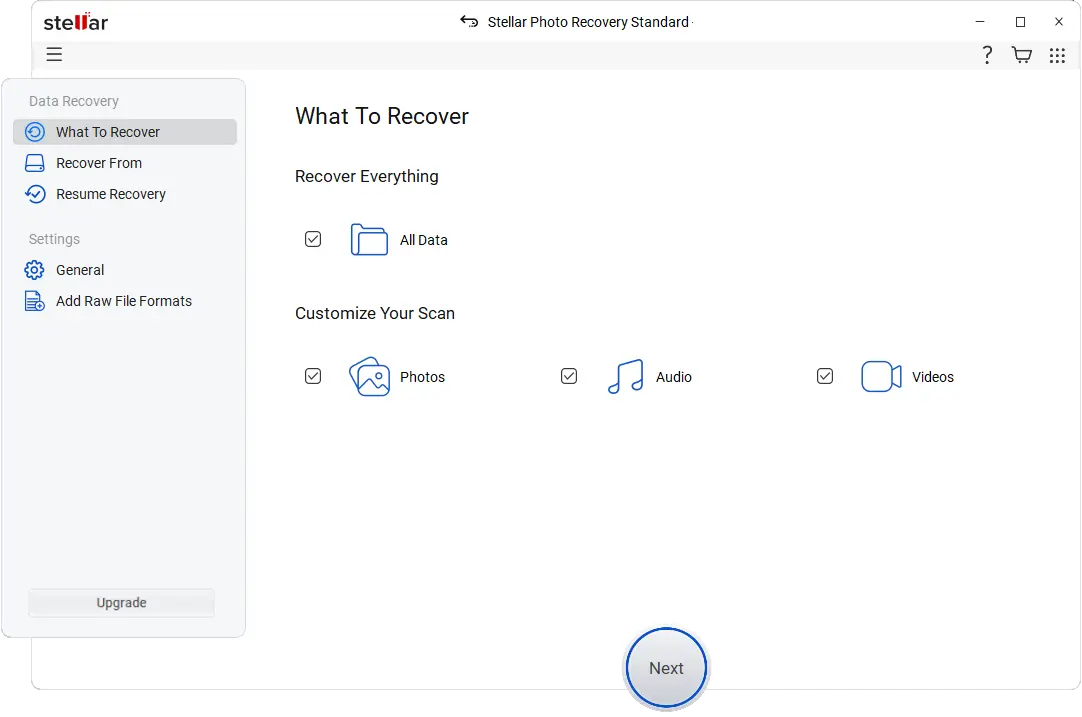
Step 2: Start and Pick Drive
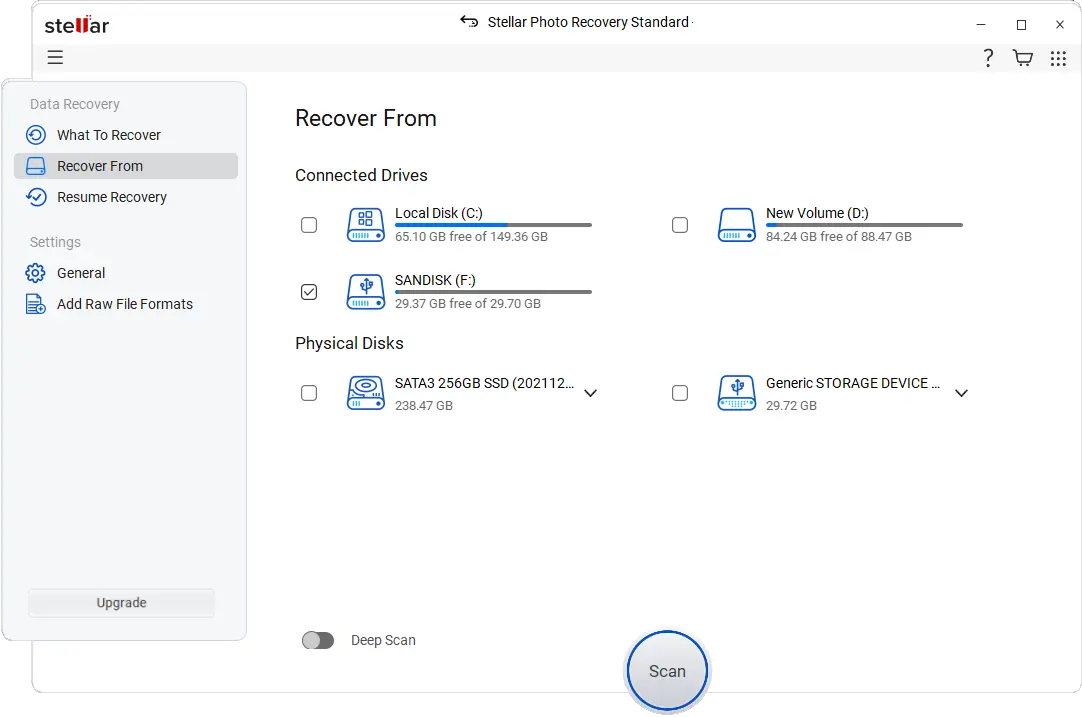
Launch Stellar Photo Recovery and pick the storage device with your lost or deleted photos. This process works even for photo recovery for Windows or photo recovery for Mac users.
Step 3: Pick scan method
Choose between Quick Scan for recently deleted photos or Deep Scan to recover lost photos from formatted drive or damaged devices.
Step 4: Preview and Mark Files
After scanning, preview recovered media to confirm quality.
Step 5: Recover and Store Securely
Finally, select recovered files and save them safely on another drive. This is the best photo recovery software for PC users who value reliability.
If you are dealing with other email data conversion or backup, software like SysTools IMAP Backup or SysTools OLM Converter might also be useful.
Upsides and Downsides of Stellar Photo Recovery Tools
Here are some upsides and downsides of stellar photo recovery software are given below:
Upsides | Downsides |
Easy-to-use interface | License required for saving recovery |
Supports multiple file types | Recovery speed depends on device health |
Deep scan finds hidden files | Preview only in free version |
Unlimited recovery with license | Professional plan cost is higher |
Certified cleanroom labs | No mobile app support |
Why Choose Stellar Photo Recovery?
There are several reasons for choosing stellar photo recovery software:
Unlimited recoveries after license activation
100% data recovery tool success in lab services
Perfect for photo recovery tool for photographers and videographers
Efficient SD card recovery capability for all storage media
Works on Windows and Mac without issues
Helps recover corrupted image files on Windows and restore deleted videos and audio files
24/5 customer support and physical recovery centers across India
This is truly the best software to recover photos from damaged SD cards and worth every penny.
For additional trusted recovery software options in different global locations, BitRecover’s New York solution is another reputable choice for data restoration needs; learn more at BitRecover New York.
Final Thoughts
Ultimately, the Stellar Photo Recovery application is a competent, user-friendly, and the best alternative for photo recovery software in terms of retrieving lost or deleted media. It does not matter if you want to get back your deleted pictures, recover lost ones from a formatted drive, or access photos after a system crash or accidental deletion, this picture recovery software always provides you with peace of mind. This is particularly advantageous for experts who require a trustworthy tool for photographers and videographers.
The free version limits recovery, while the licensed one allows full retrieval of videos, photos, and audio. It’s compatible with photo recovery for Windows and photo recovery for Mac, extending accessibility to all users. So, if you’re wondering, is Stellar Photo Recovery worth it? absolutely yes
For more professional-grade backup and recovery tools including email and OST converters, visiting SysTools OST Converter or SysTools Gmail Backup might provide further utility for your data management needs.