



What is MetaTrader 4 Forex Trading
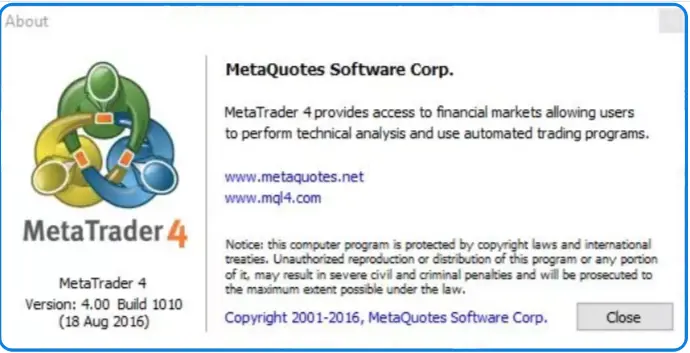
MetaTrader 4 (MT4) is an electronic trading platform developed by MetaQuotes Software Corp., a software company founded in 2000. Launched in 2005, MT4 has established itself as one of the most widely adopted trading platforms globally, particularly for retail foreign exchange (forex) traders and CFD investors. MT4 operates on a client-server architecture designed to facilitate real-time trading across multiple financial markets.
This comprehensive guide explores everything a beginner needs to know about getting started with MT4 trading, from understanding foundational concepts like what is forex trading to mastering advanced charting and indicators. Learn how the forex market works.

Installing and Setting Up MetaTrader 4
How to Install MetaTrader 4 on Windows PC
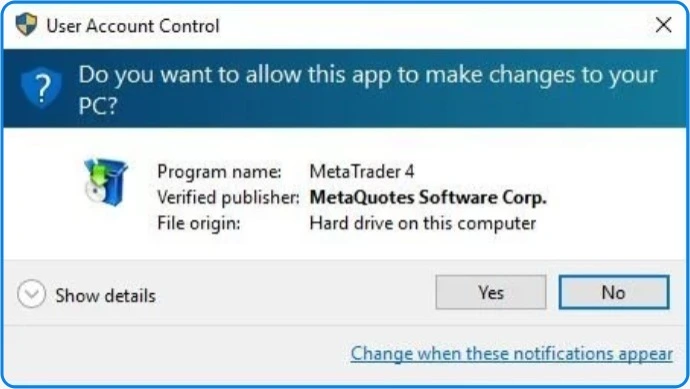
- Download the MetaTrader 4 installer from your broker's official website (not directly from MetaQuotes).
- Locate and double-click the downloaded .exe file to start the installation wizard.
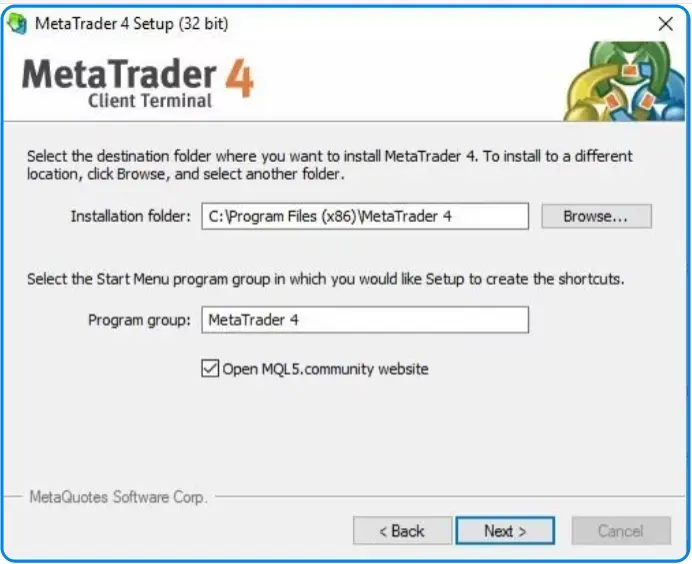
- Follow the on-screen prompts and accept the license agreement.
- Choose your preferred installation folder (or keep the default location).
- Click "Finish" to complete the setup process.
- The ClipsTrust research team recommends using default settings unless you need to change specific system preferences.
System Requirements for MT4 Trading
| Requirement | Details |
|---|---|
| Operating System | Windows XP or newer (Windows 10/11 recommended) |
| Disk Space | Minimum 50 MB free space |
| Internet Connection | Stable broadband internet |
| Hardware Compatibility | Most modern computers meet these requirements |
Connecting to Your Trading Account
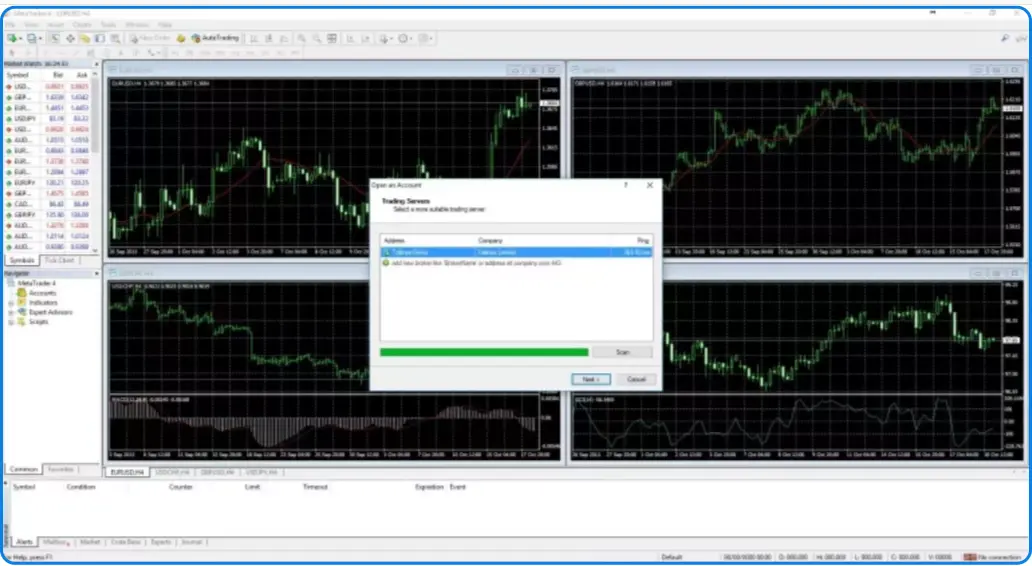
After installation, launch MT4 trading and enter your broker's server details in the login window. Input your account number and password provided during account opening. The ClipsTrust team recommends verifying account credentials before attempting a connection to avoid lockouts.
MT4 vs MT5: Which Platform Suits You?
MetaTrader 5 Step-by-Step Guide
What is MetaTrader 5- a step-by-step guide shares similar installation processes with MT4 trading but offers enhanced features. MT5 includes 21 timeframes compared to MT4's 9, providing more granular analysis capabilities.
MT5's MQL5 programming language incorporates object-oriented design, enabling more complex automated trading strategies. The platform supports economic calendars and built-in chat systems absent in MT4.
MT4 vs MT5
MT4 vs MT5 comparison reveals distinct differences in features and capabilities. MT4 remains simpler and lighter on system resources, making it ideal for traders with older computers or those preferring straightforward interfaces.
MT5 requires modern 64-bit systems but offers superior performance when running multiple charts and indicators simultaneously. The ClipsTrust research team notes MT5 provides better charting tools, more indicators, and advanced strategy backtesting capabilities.
| Feature | MT4 | MT5 |
|---|---|---|
| Timeframes | 9 available | 21 available |
| Built-in Indicators | 30 indicators | 38 indicators |
| Programming Language | MQL4 (procedural) | MQL5 (object-oriented) |
| Economic Calendar | Not included | Built-in |
| Backtesting Speed | Standard | Faster multi-threaded |
| Supported Assets | Forex, CFDs | Forex, CFDs, Stocks, Futures |
| System Requirements | Older PCs acceptable | Modern 64-bit systems |
| User Interface | Simpler, lighter | More complex, feature-rich |
Mastering MT4 Interface and Features
MT4 Interface Overview
The MT4 interface consists of several key components. The toolbar displays chart manipulation tools, drawing objects, and timeframe selection. The Market Watch window shows available trading instruments with real-time prices.
The Navigator window provides access to expert advisors, custom indicators, and trading signals. The Terminal window displays account information, trade history, and pending orders. The ClipsTrust team recommends customizing layouts to match your personal preferences and trading style. Understand what Is Leverage in Forex Trading.
Understanding MT4 trading Charting Tools
TradingView forex charting software represents one alternative, but MT4 offers robust built-in charting capabilities. Customize candlestick, bar, or line charts directly through the Properties dialog. Add horizontal and vertical lines to identify support and resistance levels.
The ClipsTrust research team explains that MT4 trading supports 24 graphical objects, including Fibonacci retracements, trend lines, and channels for technical analysis. Save customized chart layouts as templates for quick application across multiple instruments. Learn the difference between ECN vs STP vs Market Maker brokers.
Opening Trades and Managing Positions
How to Open a Trade in MT4
Opening trades requires identifying the Market Watch window and double-clicking your desired currency pair. The new order window opens, allowing specification of order type (market or pending), lot size, stop-loss, and take-profit levels.
The ClipsTrust team recommends always setting stop-loss orders to limit potential losses. Market orders execute immediately at current prices, while pending orders wait for specified price levels before execution. Discover Forex Trading Methods for Beginners used by professional traders.
Understanding Trade Execution
Market execution fills orders immediately at the current bid or ask price. The ClipsTrust research team notes this execution type suits traders preferring guaranteed fills over potential slippage. Pending orders accumulate until specified conditions trigger execution. Understand one of the type of forex trading, what is islamic forex accounts?
Trailing stops automatically adjust as favorable price movements occur, protecting profits while allowing continued growth. This advanced feature proves particularly useful for swing trading and longer-term positions.
Understanding Forex Trading Basics
What is Forex Trading?
Forex trading essentially involves buying and selling currency pairs in the global foreign exchange market. The forex market operates 24 hours during weekdays across major financial centers, making it the largest and most liquid financial market worldwide. According to the ClipsTrust research team, approximately $6 trillion in daily trading volume occurs in the forex market, providing excellent liquidity for traders. Users also search to know about how to open a forex trading account online?
When you engage in currency pair trading, you're essentially speculating on price movements between two currencies. The first currency in a pair is the base currency, while the second is the quote currency. For instance, in EUR/USD, the Euro is the base currency and the US Dollar is the quote currency.
Forex Trading vs Stock Trading
Understanding Forex trading vs stock trading is crucial for beginners. Stock trading involves buying shares of companies, while forex trading focuses on currency exchange rates. The forex market operates continuously from Sunday evening through Friday evening across multiple global sessions, unlike stock markets with fixed hours. Exlpore more to undestand about how to use forex tradingview chart for analysis.
Technical Analysis: Charting and Indicators
Best Forex Indicators for Beginners
Best forex indicators for beginners include moving averages, stochastic oscillators, and RSI. Moving averages smooth price action, revealing underlying trends by calculating average prices over selected periods.
RSI overbought and oversold conditions identify extreme market situations. Values above 70 suggest overbought conditions where selling pressure may emerge. Values below 30 indicate oversold conditions where buying interest might resume. The ClipsTrust team emphasizes using RSI alongside other indicators for confirmation. You may also find our article on what is Pips in Forex Trading?
MACD Trend Reversal Identification
MACD trend reversal identification occurs when the MACD line crosses the signal line. Bearish crossovers (MACD crossing below signal line) suggest downtrend development, while bullish crossovers indicate uptrend formation.
The histogram displays the distance between the MACD and signal lines, with expanding bars suggesting increasing momentum and contracting bars indicating weakening trends. The ClipsTrust research team notes MACD works exceptionally well on 4-hour and daily timeframes. Learn about the Types of Currency Pairs in Forex Market.
Bollinger Bands Trading Strategy
Bollinger Bands trading strategy utilizes upper and lower bands positioned two standard deviations from a simple moving average. Price touching the upper bands suggests overbought conditions, while lower band touches indicate oversold situations.
Squeeze patterns where bands contract often precede significant price movements. The ClipsTrust team recommends combining Bollinger Bands with other indicators, like RSI, for entry confirmation. Learn how to use best Forex Trading Indicators RSI, MACD, and Moving Averages.
Stochastic Oscillator Trading Strategy
The stochastic oscillator trading strategy measures momentum by comparing closing prices to price ranges. The indicator ranges from 0-100, with values above 80 suggesting overbought conditions and values below 20 indicating oversold situations.
The stochastic generates signals when the %K line crosses the %D line. Crossovers above 20 suggest buy signals, while crossovers below 80 indicate sell signals. The ClipsTrust research team emphasizes that stochastic works best in ranging markets rather than strong trends. Learn how to fund a forex trading account in forex.
Advanced Indicators and Technical Tools
RSI Moving Average Crossover Strategy
RSI Moving Average Crossover Strategy combines momentum and trend-following approaches. When RSI breaks above 50 while price crosses above its moving average, strong buy signals form. Corresponding sell signals occur when RSI drops below 50 alongside bearish price crossovers.
MetaTrader Expert Advisors
MetaTrader Expert Advisors (EAs) automate trading by executing predetermined rules without human intervention. EAs analyze market conditions continuously and execute trades matching specified criteria.
Best Forex Trading Strategies
Overview of Beginner-Friendly Strategies
Best forex trading strategies for beginners focus on simplicity and trending market identification. The ClipsTrust research team recommends trend-following approaches as foundational strategies before exploring more complex methodologies.
Successful strategy implementation requires rigorous backtesting, position sizing discipline, and emotional control during drawdown periods. The team emphasizes that no strategy works perfectly in all market conditions.
Scalping Trading Strategy
Scalping trading strategy involves opening and closing trades within minutes, targeting small 5-20 pip profits. Scalping requires tight spreads, fast execution, and disciplined position management.
A forex scalping strategy within one trading session focuses on high-frequency trading during specific volatile sessions. London and New York overlap periods provide excellent scalping opportunities. The ClipsTrust research team cautions that scalping demands constant monitoring and quick decision-making. Explore everything you need to know about the Minimum deposit for forex trading.
Scalping vs Day Trading
Scalping vs day trading differences involve the timeframe and holding period. Scalping maintains positions for seconds to minutes, while day trading holds for hours within a single trading session. Day trading allows longer analysis periods compared to scalping's fast-paced environment. The ClipsTrust team notes that beginning traders should master day trading before attempting more demanding scalping approaches.
Swing Trading Strategy
Swing Trading Strategy captures medium-term price movements lasting days to weeks. Swing traders identify support and resistance levels, then enter positions anticipating reversals or breakouts.
Swing trading forex strategies benefit from technical analysis tools, including moving averages, RSI, and Bollinger Bands. The ClipsTrust research team identifies swing trading as more suitable for working traders lacking time for day trading or scalping.
Price Action Trading
Price action trading relies on price and volume analysis without relying heavily on indicators. Price action traders identify key support and resistance levels, patterns like pin bars and inside bars, and order flow dynamics.
The ClipsTrust team notes that price action trading requires substantial experience and chart reading skills, making it better suited for intermediate traders rather than absolute beginners.
Advanced Features and Tools
Best Forex Trading Apps
Best Forex Trading Apps include MetaTrader 4 mobile versions available on iOS and Android. Mobile apps provide full functionality, including chart analysis, order placement, and position management.
The ClipsTrust research team recommends maintaining desktop MT4 trading for detailed analysis while using mobile apps for position monitoring and emergency trade management.
Forex Trading Sessions and Market Hours
Foreign Exchange Hours
Foreign exchange hours operate across four major sessions providing continuous market access. The Sydney session (10 PM - 7 AM GMT) features lower volatility and provides initial daily direction setting.
The Tokyo session (12 AM - 9 AM GMT) emphasizes JPY pairs with moderate volatility. The London session (8 AM - 5 PM GMT) provides the highest liquidity and volatility with tight spreads.
The New York session (1 PM - 10 PM GMT) maintains strong volatility and volume, especially during London-New York overlap periods. The ClipsTrust team recommends trading during sessions matching your geographic location and preferred volatility levels.
Forex Major Pairs: Essential Trading Instruments
Forex major pairs consist of EUR/USD, GBP/USD, USD/JPY, USD/CHF, AUD/USD, USD/CAD, and NZD/USD. These pairs account for approximately 85% of forex trading volume.
Major pairs feature tight spreads, excellent liquidity, and minimal slippage, making them ideal for learning forex trading. The ClipsTrust team recommends beginning with 2-3 major pairs before expanding to minor or exotic pairs.
MT4 Trading Case Studies: Real-World Trading Scenarios
Case Study 1: Trend Trading EUR/USD
A beginner trader identifies a strong uptrend in EUR/USD using simple moving average crossovers. Entry occurs when the 20-period moving average crosses above the 50-period moving average with confirmation from RSI above 50.
The trader sets a stop-loss at 50 pips below the entry and takes profits at the resistance levels identified through horizontal support and resistance analysis. Over three months of consistent trend trading following this simple system, the trader achieves 18% account growth with four successful trades and two breaking-even results.
Case Study 2: Swing Trading GBP/USD with Technical Analysis
Another trader applies swing trading principles to GBP/USD during the London session. Using Bollinger Bands, RSI, and support/resistance identification, the trader enters when the price touches the lower Bollinger Band with RSI below 30.
Over two months, this approach generates eight trades with six winners and two losers, resulting in 12% account growth. The key to success involved taking profits at identified resistance levels rather than holding for extended moves.
Pros and Cons of the MT4 Trading Platform
Advantages of MetaTrader 4
- MetaTrader 4 provides exceptional ease of use with an intuitive interface ideal for complete beginners.
- The platform includes 30 built-in indicators, 2000+ free custom indicators, and 700+ premium indicators available through the MQL5 marketplace.
- MT4's automated trading capabilities through Expert Advisors (EAs) are highlighted as a major advantage by the ClipsTrust team.
- Its widespread global adoption offers access to extensive educational resources, forums, and community support.
- Supports full-featured mobile trading on both iOS and Android, enabling traders to manage positions from anywhere.
Disadvantages of MetaTrader 4
- MetaTrader 4 lacks modern features compared to newer platforms like MT5.
- The charting tools are basic and offer limited advanced customization options.
- The MQL4 programming language is outdated and restricts the development of sophisticated indicators and expert advisors (EAs).
- MT4 does not include a built-in economic calendar; it requires external add-ons.
- The platform uses a single-threaded architecture, reducing its ability to process multiple tasks efficiently.
Expert Tips and Notes from the ClipsTrust Team
Tip 1: Master Demo Trading Before Live Trading
The ClipsTrust research team emphasizes spending a minimum 3-6 months on demo accounts, learning platform functionality, testing strategies, and developing trading psychology. Demo trading eliminates financial stress while building experience.
Tip 2: Risk Management Supersedes Profit Maximization
According to the ClipsTrust team, limiting individual trade risks to 1-2% of account capital protects accounts from catastrophic losses. Disciplined stop-loss placement and position sizing determine long-term trading success more than indicator selection.
FAQ: Frequently Asked Questions About MT4 Trading
Conclusion
The ClipsTrust research team identifies MetaTrader 4 as an excellent platform for beginning forex traders seeking comprehensive technical analysis tools, reliable execution, and accessibility. While newer MT5 offers advanced features, MT4's simplicity and widespread adoption make it ideal for developing fundamental trading skills.
Success in forex trading depends less on platform selection and more on proper education, risk management discipline, and consistent strategy execution. The ClipsTrust team recommends investing time in demo account practice, studying market fundamentals, and developing personal trading systems before committing real capital.
Leave a Comment